Kanban Reorder Cards: Trigger Reorders and Show What Is Already On Order
A kanban card turns low stock into a visible reorder signal with sourcing details and order status.

- Creator
 WillytheMinimalist
- Company
- Hunter Trim & Cabinets Inc.
- Wastes
People wait for stock or create excess inventory when reorder timing, sourcing details, and order status are held in memory instead of being visible to everyone.
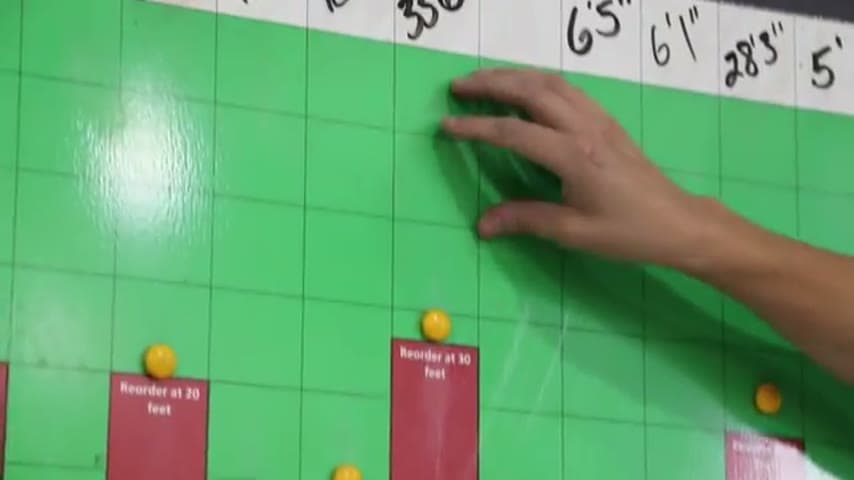
The team used kanban cards that are pulled when stock reaches a set level. Each card triggers the reorder, lists sourcing details, and shows when the item is already on order.
Make replenishment knowledge visible and reusable at the point of use.
What is a Kanban Reorder Cards?
A kanban reorder card is a visual signal for replenishment. In the transcript, kanban is explained as a Japanese word meaning signal.
The card is placed with the stock and pulled when the item reaches a defined level. Pulling the card tells the team that a reorder is needed.
The card also carries the knowledge needed to act correctly. It lists sourcing details and shows when stock is already on order, so people do not have to rediscover how to buy the item or accidentally order it twice.
Why it works
It turns reorder knowledge into a reusable standard that adds value by keeping needed stock available while reducing ordering errors.
- Knowledge reuse: sourcing details stay with the reorder signal, so anyone can use the same proven information.
- Added value: the card connects low stock to the action that protects work from waiting.
- Mistake-proofing: showing that stock is on order helps prevent duplicate orders and missed orders.
- Standardization: a defined pull level replaces individual judgment with a shared trigger.
Evidence: The transcript states that kanban means signal and that when stock gets to a certain level, they pull the card.
How to create this idea
- 1Pick repeat stock
Start with an item that is bought repeatedly and causes waiting when it runs out or excess inventory when it is reordered too early.
- 2Set the pull level
Decide the stock level where the kanban card must be pulled. Make the trigger level easy to recognize.
- 3Create the card
Write the item name, reorder trigger, and sourcing details needed to place the reorder.
- 4Add order status
Add a clear way to show that stock is already on order. This prevents another person from placing a duplicate reorder.
- 5Keep it with stock
Place the kanban card where the low stock condition is seen. The card should be available at the moment the reorder signal appears.
- 6Reset after receipt
When the stock arrives, return the card to its trigger position. Correct the card immediately if the sourcing details or trigger level are wrong.
Best used when
- repeat purchases
- shared stock
- maintenance parts
- office supplies
- production materials
Less useful when
- one time buys
- custom orders
- rare demand
- unknown sourcing
Products and tools mentioned
- Kanban cards: Signal cards that trigger material replenishment when inventory reaches a set point.
Tags
- Problem
- stockoutswaitinginventoryoverordering
- Lean methods
- kanbanvisual managementpull systemmistake proofing
- Application
- replenishmentpurchasingstockroomoffice supplies
Captured from WillytheMinimalist at Hunter Trim & Cabinets Inc. in the video "Lean Tour of Hunter Trim & Cabinets Inc.", at 00:01:35. On Lean Toolbox. Watch the original video on YouTube ↗