Kanban Reorder Trigger: Reorder Two Boxes When Stock Reaches Two
Update the visible reorder rule so the next person repeats the proven replenishment decision.

- Creator
- Hunter Trim & Cabinets
- Company
- Hunter Trim & Cabinets
- Wastes
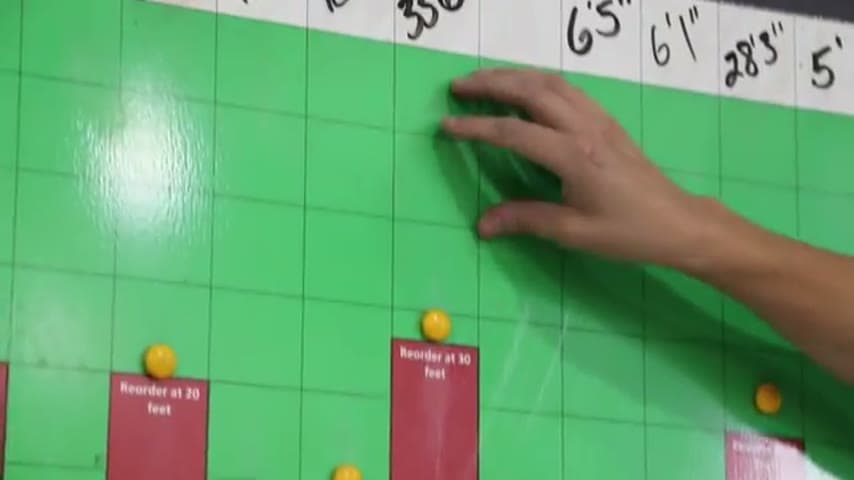
The team ran completely out of an item even though it had been reordered. The old Kanban rule said to reorder one box, which did not protect the process from a stockout.
They changed the Kanban trigger to a two. Now, when stock reaches two boxes, the team reorders two more boxes.
Make replenishment knowledge visible and reusable at the point of use.
What is a Kanban Reorder Trigger?
A Kanban reorder trigger is a visible rule that tells people when to replenish stock and how much to order. It turns a supply decision into a standard that anyone can follow.
In this example, the old rule was too weak. The team had run completely out after reordering, so they updated the trigger from one box to two boxes.
The improvement captures learning from the stockout. Instead of relying on memory or judgment, the corrected rule is visible for the next person who checks the stock.
Why it works
This works because it reuses knowledge from a real stockout and turns it into a mistake-proof reorder standard.
- Prevents people from repeating the old one box reorder decision.
- Adds value by keeping needed material available for work instead of waiting on stock.
- Makes the correct reorder point and reorder quantity visible where the decision is made.
- Converts a supply problem into a reusable standard for the team.
Evidence: The transcript says the team ran completely out even though they had reordered, then changed the trigger so that when stock gets down to two boxes, they reorder two more boxes.
How to create this idea
- 1Find the stockout
Identify an item that ran out even though the Kanban rule was followed. Use that failure as evidence that the trigger needs review.
- 2Read the current rule
Check the existing reorder point and reorder quantity. Confirm what the user is being told to do today.
- 3Set the new trigger
Change the rule to match what the process needs. In this case, reorder two boxes when two boxes remain.
- 4Make it visible
Update the Kanban trigger at the storage location. The person counting stock should see the corrected decision immediately.
- 5Check the next cycle
Watch the next reorder cycle to see whether the stockout is prevented. If the item still runs out, adjust the trigger again based on actual use.
Best used when
- repeat stockouts
- shared supplies
- Kanban shelves
- reorder points
- routine replenishment
Less useful when
- one time items
- unknown demand
- obsolete stock
- no reorder control
Tags
- Problem
- stockoutwaitinginventory
- Lean methods
- Kanbanstandard workmistake proofing
- Application
- replenishmentmaterialsstorage
Captured from Hunter Trim & Cabinets at Hunter Trim & Cabinets in the video "Lean Improvements 7/31/26", at 00:05:59. On Lean Toolbox. Watch the original video on YouTube ↗