Below Minimum Stock Need Tags: Trigger Steel Replenishment Before Stockout
A minimum line, movable magnet, and need tag make the reorder point visible to operators and purchasing.
- Creator
 Northwestern Michigan College
- Company
- Hayes Manufacturing
- Wastes
Operators consume steel while the reorder point is easy to miss, so purchasing may not know replenishment is needed until the material is too low or gone.
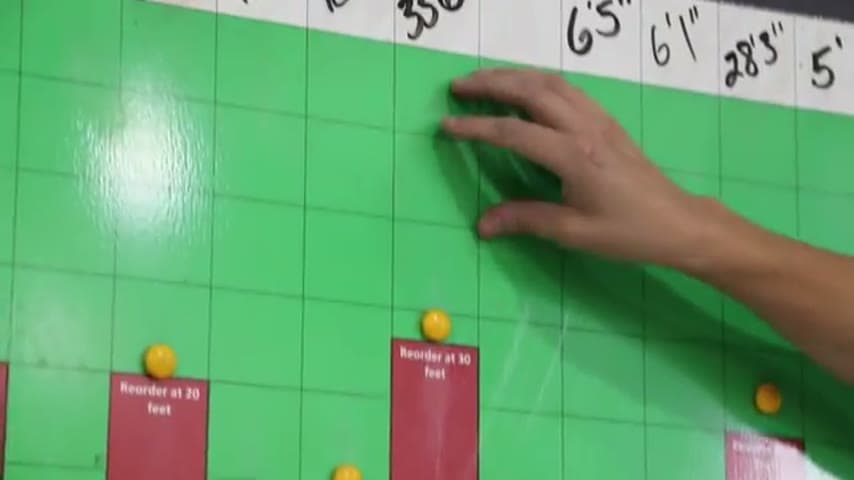
The team records the actual length for each material, marks a minimum line, and uses a magnet to show current stock. After cutting, the operator remeasures, updates the quantity, and moves the magnet. If the stock falls below the minimum line, the operator pulls the need tag from the need hook for purchasing to collect and replenish the steel.
Make replenishment knowledge visible and reusable at the point of use.
What is a Below Minimum Stock Need Tags?
A below minimum stock need tag is a physical reorder signal tied to a visible minimum level. It tells the operator when to ask for replenishment and gives purchasing a simple item to collect.
In the example, the material is 6 1/2 inch 8620 steel. The actual amount is recorded as 33 ft 6 in, and the team has a 30 ft minimum line. A magnet shows where the current quantity sits against that line.
As the operator cuts material, he remeasures, changes the recorded quantity, and moves the magnet. When the stock drops below the line, he pulls the need tag hanging on the need hook, and purchasing collects it to replenish the steel.
Why it works
The system reuses a proven reorder point by placing it directly where the material is consumed, so the decision does not depend on memory or individual judgment.
- Reuses knowledge by making the minimum stock level visible for every operator.
- Adds value by giving purchasing a clear replenishment signal while operators keep making customer parts.
- Mistake-proofs the reorder trigger with a line, magnet, and physical need tag instead of informal messages.
- Reduces waiting risk because the need is signaled when stock falls below the minimum, not after the steel is gone.
Evidence: The transcript shows a 30 ft minimum line, the operator remeasuring and moving a magnet after cutting, pulling a need tag when below the line, and purchasing collecting tags to replenish steel.
How to create this idea
- 1Choose one material
Start with a material that is used repeatedly and can cause waiting if it runs low. Label it clearly, such as 6 1/2 inch 8620 steel.
- 2Set the minimum
Define the lowest acceptable amount for that material. Mark the minimum as a visible line at the storage location.
- 3Show actual stock
Record the current quantity where the operator can see it. Use a magnet or similar marker to show the current amount against the minimum line.
- 4Add the need tag
Hang a need tag on a need hook at the material location. Make sure the tag tells purchasing what material needs replenishment.
- 5Update after use
After cutting material, have the operator remeasure, update the recorded quantity, and move the magnet to the new level.
- 6Pull below minimum
When the magnet or quantity falls below the minimum line, the operator pulls the need tag from the need hook.
- 7Collect and replenish
Have purchasing come around to collect pulled need tags. Use those tags as the trigger to replenish the matching steel.
Best used when
- raw material stock
- repeat steel sizes
- visible inventory
- operator measured stock
- purchasing pickup
Less useful when
- one time material
- hidden stock
- no stock owner
- unmeasured inventory
- unstable minimums
Tags
- Problem
- inventorywaitingstockout
- Lean methods
- kanbanvisual managementmistake-proofing
- Application
- purchasingraw materialsteel stock
Captured from Northwestern Michigan College at Hayes Manufacturing in the video "Lean Management Systems: Visual Management at Hayes Manufacturing", at 00:07:28. On Lean Toolbox. Watch the original video on YouTube ↗