Movable Job Magnets: Show Planned Start and Finish on a Time-Scaled Board
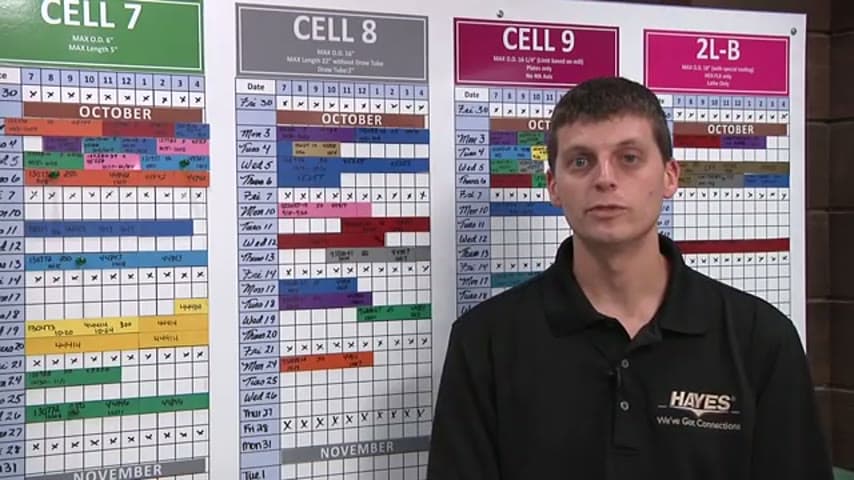
A visual schedule board uses movable magnets so the team can see each job's planned start and finish.
- Creator
 Northwestern Michigan College
- Company
- Hayes Manufacturing
- Wastes
The order process was handled by one production control manager, making the schedule hard for others to see and use. The team was also dealing with late deliveries.
The team moved to visual management by placing movable job magnets on a time-scaled board. Each magnet shows a job and its planned start and finish on the schedule.
Make scheduling knowledge visible, reusable, and easy to check for errors.
What is a Movable Job Magnets?
Movable job magnets are physical schedule markers. Each magnet represents one job and can be placed on a time-scaled board to show when that job is planned to start and finish.
A time-scaled board turns the production plan into a shared visual reference. Instead of the order process being understood mainly by one person, the plan is visible to the team.
Because the job magnets move, changes can be shown directly on the board. The updated plan stays visible, so people do not have to re-solve the schedule from memory or repeat avoidable planning mistakes.
Why it works
This works because it turns hidden scheduling knowledge into a visible, reusable plan that helps the team add value and prevent errors.
- Knowledge reuse: the planned start and finish for each job are captured once and made available to everyone who needs the plan.
- Added value: people can focus on doing the right job at the right time instead of searching for schedule information or waiting for one person to explain it.
- Mistake-proofing: visible job positions make missing jobs, overlapping plans, and unrealistic timing easier to see before they create delivery problems.
- Shared learning: when the plan changes, the board shows the change, so the team learns from the same current schedule.
Evidence: The transcript says the move to visual management was based on late deliveries, with about 35 percent late deliveries at the start of the lean journey, and that the order process was handled by one production control manager.
How to create this idea
- 1Choose the time scale
Lay out the board by the time unit used for planning, such as hours, days, or weeks. Make the scale easy to read where the team reviews the plan.
- 2Make job magnets
Create one movable job magnet for each job. Label it with the minimum information needed to identify the job.
- 3Mark start and finish
Place each magnet on the time-scaled board so the job's planned start and finish are clear. Keep the board focused on the current production plan.
- 4Update changes immediately
When the plan changes, move the job magnet right away. Do not let a hidden schedule and the visual board show different plans.
- 5Review as a team
Use the board during daily or shift reviews to check priorities, timing, and delivery risk. Treat visible conflicts as problems to solve, not as blame.
Best used when
- late deliveries
- job shop scheduling
- many active jobs
- shared planning
- one person scheduling
Less useful when
- fixed repetitive flow
- few active jobs
- no schedule changes
- automated dispatching
Tags
- Problem
- late deliverywaitingoverproductionhidden schedule
- Lean methods
- visual managementscheduling boardmistake proofing
- Application
- production controlschedulingjob shop
Captured from Northwestern Michigan College at Hayes Manufacturing in the video "Lean Management Systems: Visual Management at Hayes Manufacturing", at 00:01:47. On Lean Toolbox. Watch the original video on YouTube ↗