Mother A3 Board: Display Annual Big Rocks and Strategic Project Status
A visible mother A3 gives management one shared place to see annual priorities and project progress.
- Creator
 Northwestern Michigan College
- Company
- Hayes Manufacturing
- Wastes
The team had strategic planning data but needed a clear way to turn it into annual priorities and see project status without waiting for separate updates.
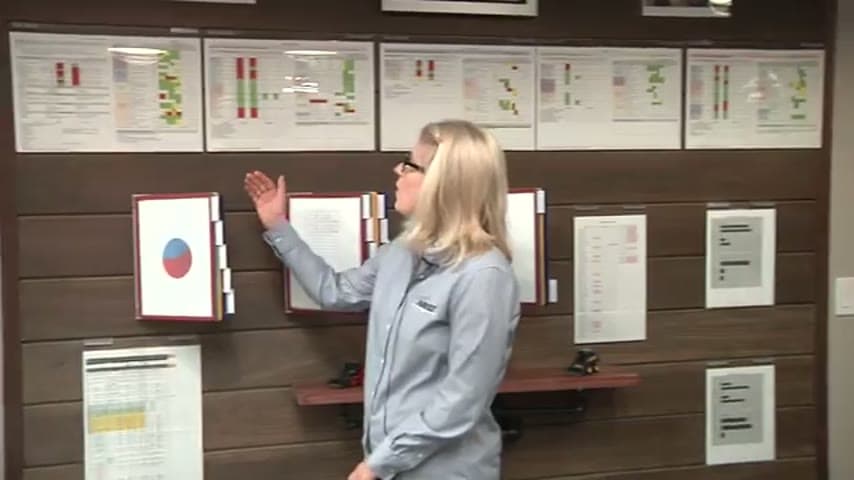
After training in the A3 format, the team created a mother A3, identified the big rocks for the year, and displayed each strategic project's status on a board.
Make planning knowledge visible and reusable so teams align on proven priorities.
What is a Mother A3 Board?
A mother A3 board is a central visual plan that connects annual strategy to the projects that carry it out. In this example, the team used the A3 format after strategic planning training and created a mother A3 for the year.
The board displays the annual big rocks, the major priorities the team wants to accomplish, along with the status of each strategic project. It gives management one place to see what matters and how the work is progressing.
Instead of leaving strategy in scattered data, meeting notes, or individual memory, the mother A3 board becomes a reusable reference for planning, review, and follow up.
Why it works
The board turns strategic planning knowledge into a shared source of truth that people can reuse.
- It preserves the annual priorities in a common A3 format, so managers do not have to reconstruct the plan from scattered data.
- It connects projects to the big rocks, helping teams focus effort on work that adds value to the strategy.
- It reduces waiting for status information because project progress is visible in one shared place.
- It mistake-proofs strategy deployment by making missing status, unclear priorities, and off-target work easier to see.
Evidence: The transcript says the team was trained in strategic planning using the A3 format, created a mother A3, identified big rocks for the whole year, and displayed them for management to see.
How to create this idea
- 1Learn the A3 format
Use one planning structure so the team records priorities, decisions, and project status in a consistent way.
- 2Create the mother A3
Build one parent A3 that summarizes the annual strategy. Keep it simple enough to read and review quickly.
- 3Name the big rocks
Identify the major priorities for the year. These should be the few items that guide strategic project choices.
- 4Add project status
List the strategic projects that support the big rocks and show each project's status on the board.
- 5Review and update
Use the board during management reviews. Keep status current so the mother A3 remains a reliable reference.
Best used when
- annual planning
- strategy deployment
- management reviews
- multiple projects
Less useful when
- single task
- unclear goals
- no update habit
Tags
- Problem
- waitinghidden statusunclear priorities
- Lean methods
- A3visual managementknowledge reuse
- Application
- strategic planningmanagement reviewproject tracking
Captured from Northwestern Michigan College at Hayes Manufacturing in the video "Lean Management Systems: Visual Management at Hayes Manufacturing", at 00:10:00. On Lean Toolbox. Watch the original video on YouTube ↗