Visual Kanban Board for Saw Department Material Replenishment
A wall board shows every material to keep on hand and signals when to reorder before the saw runs out.
- Creator
 Northwestern Michigan College
- Company
- Hayes Manufacturing
- Wastes
The saw department needs specific raw materials on hand to cut the parts it makes, but without a visible signal it is easy to run short, over-stock, or interrupt operators to check status.
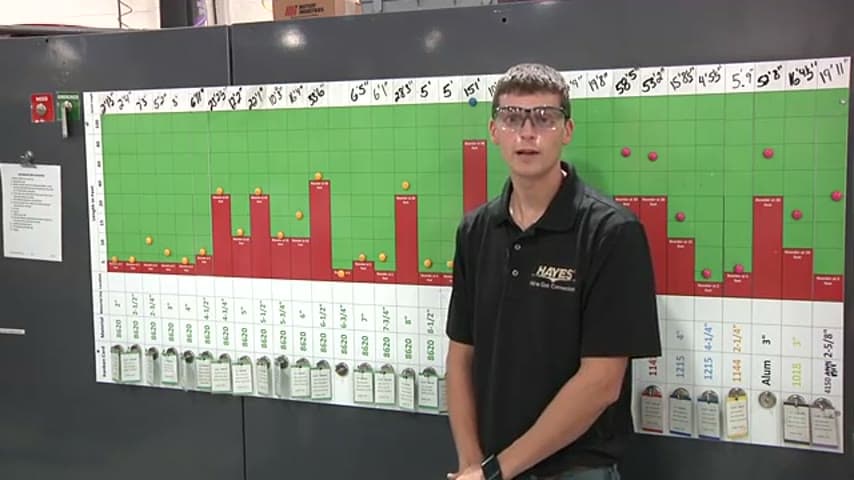
The team built a visual kanban board listing all the material the saw department must keep on hand at any time. It runs inventory on a kanban system displayed visually, so anyone can see stock levels at a glance and know when to trigger replenishment. A companion status board also shows downtime codes like TI Delta for tooling issues without interrupting operators.
Make inventory levels and reorder signals visible so replenishment happens at the right time without asking.
What is a Visual Kanban Board for Saw Department Material Replenishment?
A visual kanban board is a physical display that shows the materials a work area must keep on hand and the point at which each item needs to be reordered. It turns an invisible inventory policy into something anyone can read across the room.
In this saw department, the board lists all the material required to make the parts the shop produces. Because the inventory runs on a kanban system that is shown visually, a low or empty position on the board becomes the signal to replenish. No one has to open a spreadsheet or interrupt the operators mid-cut to find out what is running low.
The board sits alongside a related status board that captures reason codes such as TI Delta for tooling issues, so leaders can understand what happened in a given hour block at a glance.
Why it works
The board makes the correct stocking and reorder decision visible so it is reused every time instead of relying on one person's memory.
- The reorder point is standardized on the board, so the same proven decision repeats without judgment calls.
- Anyone can read material status at a glance, spreading the knowledge beyond a single planner.
- Empty or low positions act as a built-in signal, mistake-proofing against stockouts and over-ordering.
- Status codes let leaders diagnose issues without interrupting operator flow.
How to create this idea
- 1List required materials
Identify every material the department must keep on hand to make its parts.
- 2Set kanban levels
Define the minimum quantity and reorder trigger for each item.
- 3Build the visual board
Display each material with its quantity and reorder point where the team can see it.
- 4Link to replenishment
Make a low or empty position the signal to reorder, tied to your kanban system.
- 5Add status visibility
Pair with a board showing downtime or issue codes so status is readable without interrupting operators.
Best used when
- repeatable material needs
- kanban replenishment
- cutting or saw operations
Less useful when
- one-off custom jobs
- rapidly changing materials
- fully automated stocking
Tags
- Problem
- stockoutsinventoryvisibility
- Lean methods
- kanbanvisual managementreplenishment
- Application
- saw departmentmaterial handling
Captured from Northwestern Michigan College at Hayes Manufacturing in the video "Lean Management Systems: Visual Management at Hayes Manufacturing", at 00:06:55. On Lean Toolbox. Watch the original video on YouTube ↗