Overhead Shipping Camera: Photograph Each Package on the Scale Before Shipping
Capture a package photo, weight, and label action in the same shipping workflow.
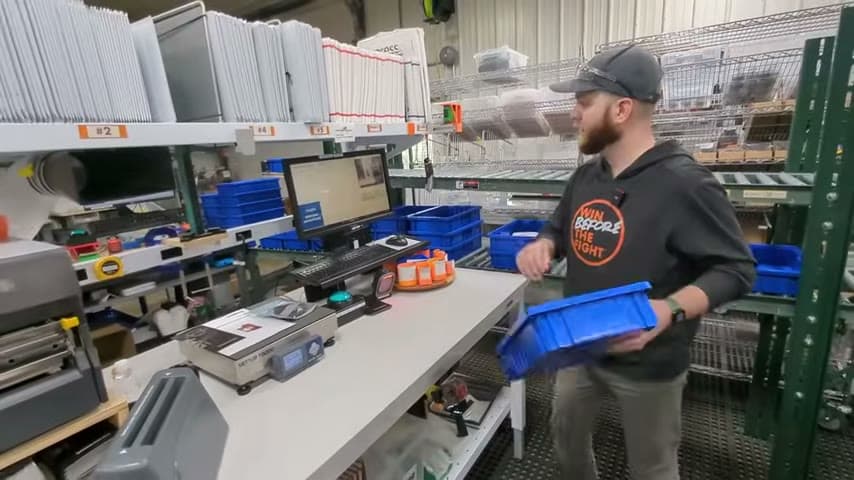
- Creator
 Audacity Micro
- Company
- Henry Holsters
- Wastes
Shipping defects are hard to investigate when there is no visual record of what was on the scale when the shipment was weighed and labeled.
The team placed an overhead document camera above the shipping scale and connected it to the shipping software. After the packing slip is scanned, one button saves the weight, buys the label, prints the postage, and takes a photo of the package on the scale.
Make proven shipping evidence visible and reusable at the point of work.
What is a Overhead Shipping Camera?
An overhead shipping camera is a document camera mounted above a shipping scale. It photographs the package while it is on the scale, before the shipment is completed.
In this example, the camera feed is part of a simplified shipping interface. The operator scans a packing slip, places the package on the scale, and uses one button to save the weight, buy the label, print the postage, and capture the photo.
The photo becomes reusable knowledge tied to the shipping action. When a defect is reviewed later, the team can look at what was actually weighed and processed instead of relying on memory.
Why it works
This improvement turns each shipment into visible, reusable knowledge that adds value and mistake proofs the shipping check.
- The package photo gives the team a record to reuse when reviewing a shipping defect.
- The same workflow captures weight, label action, postage printing, and the image, which adds verification value without a separate habit.
- The camera makes the proven check visible, so people do not have to re-solve what happened after the package leaves.
- Capturing the image with the normal shipping button helps prevent skipped documentation.
Evidence: The transcript describes a live camera feed from an overhead document camera over the scale, and one button that saves the weight, buys the label, prints the postage, and takes a photo.
How to create this idea
- 1Mount the camera
Place a document camera above the shipping scale so the camera view shows the package area clearly.
- 2Show the live view
Display the camera feed in the shipping interface so the operator can confirm the package is in view before capture.
- 3Link it to shipping
Connect the camera capture to the shipping software so the photo is saved during the normal label and postage step.
- 4Use one action
Make the standard button capture the weight and photo while completing the label and postage actions. This reduces the chance that the visual record is skipped.
- 5Review defects with evidence
When a shipping defect is reported, check the stored photo and weight record first. Use repeated findings to improve packing and shipping standards.
Best used when
- shipping defects
- packing verification
- mixed orders
- customer claims
- label checks
Less useful when
- very low volume
- identical shipments
- no software records
- camera restricted areas
Products and tools mentioned
- Document camera: Mounted overhead to provide the live camera feed and capture the package photo.
- Packing slip: Scanned to start or identify the shipping workflow.
- Shipping software: ShipStation is used as the order data system that the verification software integrates with.
- shipping scale: Used after the shipping class is announced.
Tags
- Problem
- defectsshipping errorspoor records
- Lean methods
- mistake proofingvisual managementstandard work
- Application
- shippingpackingfulfillment
Captured from Audacity Micro at Henry Holsters in the video "THIS is what a LEAN shop looks like - Lean Machine Shop Tour", at 00:12:36. On Lean Toolbox. Watch the original video on YouTube ↗