Labeled Bolt Boxes: Show Picture, Quantity, Job, and Drawing for Field Identification
Add the missing field information to each bolt box so the right hardware can be identified at the point of use.
- Creator
 Southwest Steel Buildings
- Company
- Southwest Steel Buildings
- Wastes
Bolt boxes arrive with vendor information, but the field also needs internal information to know where the bolts belong. Without the bolt picture, quantity, job, and drawing on the box, people can guess, search, or select the wrong hardware.
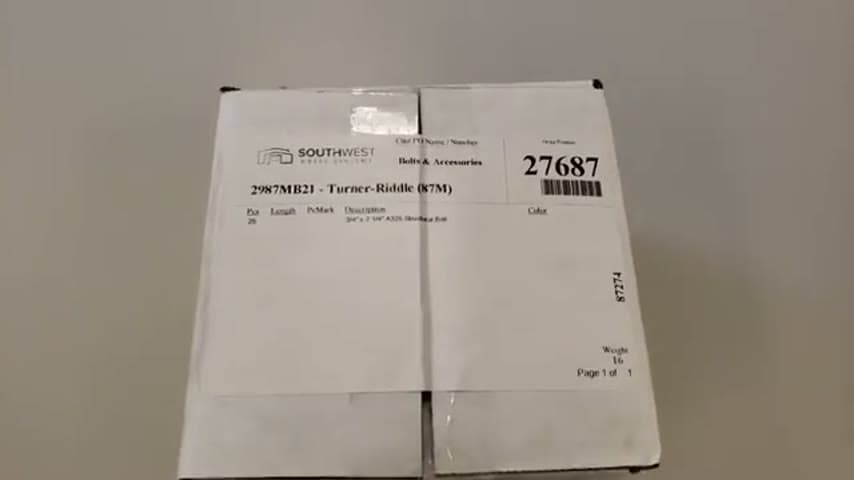
The team adds a label to each bolt box that shows the bolt picture, quantity, job, and drawing for field identification.
Make identification knowledge visible and reusable at the point of use.
What is a Labeled Bolt Boxes?
A labeled bolt box is a normal bolt package with added internal information for the field. The label shows a picture of the bolt, the quantity, the job, and the drawing reference.
The vendor package still carries vendor information. The added label adds the company's information so the box connects directly to the work it supports.
This is a visual control for hardware identification. It makes the correct selection easier to repeat and reduces dependence on memory, searching, or asking someone else.
Why it works
The label captures the identification knowledge once and reuses it every time the box is handled in the field.
- Knowledge reuse: the bolt picture, quantity, job, and drawing stay with the box instead of living in separate documents or people's memory.
- Added value: the field receives bolts with the information needed to confirm they match the work.
- Mistake proofing: visual and drawing references help prevent the wrong bolt box from being used on the wrong job.
Evidence: In the transcript, the team shows how bolts normally come packaged with vendor information, then explains that they add their own label to the package.
How to create this idea
- 1Define field needs
List the information a field user needs to identify the bolts correctly. Start with bolt picture, quantity, job, and drawing.
- 2Create one label format
Use a consistent layout so every bolt box presents the same fields in the same place. Keep it simple enough to read quickly.
- 3Add the visual cue
Include a picture of the bolt so identification is not text only. The picture helps users compare the label to the hardware need.
- 4Apply before handoff
Put the label on the bolt box before it leaves the shop, receiving area, or staging area. Do not rely only on vendor packaging.
- 5Check against the work
Verify the quantity, job, and drawing before the box is sent to the field. Use the label as a simple quality check.
- 6Ask for feedback
Have field users report what still causes confusion. Adjust the label only when the added information helps identification.
Best used when
- field installation
- job specific hardware
- similar bolts
- drawing based work
- vendor packaging
Less useful when
- one bolt type
- no field handoff
- bulk mixed bins
- unstable information
Tags
- Problem
- misidentificationwrong partdefects
- Lean methods
- visual managementmistake proofingstandard work
- Application
- field workhardwarepackaging
Captured from Southwest Steel Buildings at Southwest Steel Buildings in the video "Bolt Box Labeling Idea", at 00:00:04. On Lean Toolbox. Watch the original video on YouTube ↗