Production Boards Showing Target vs Actual Parts Per Hour
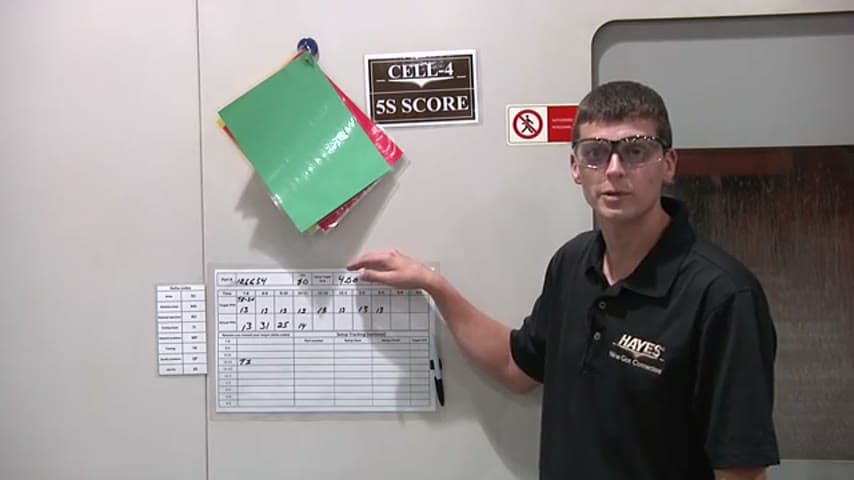
Cell-level boards post the target output against real output so gaps show up the moment they open.
- Creator
 Northwestern Michigan College
- Company
- Hayes Manufacturing
- Wastes
When only end-of-shift counts are known, a cell can fall behind for hours before anyone notices, and the reason for the gap is lost. Setup times and per-job cycle times stay in someone's head instead of on the floor.
Each cell runs a production board that lists the part number, job quantity, setup, and target time, with hourly increments across the top. The team bases the target on the time each job takes, then records actual output against it. These cell boards tie back to a master production board in the office so office and floor see the same numbers.
Make the standard rate visible at the point of work so deviations surface in real time.
What is a Production Boards Showing Target vs Actual Parts Per Hour?
A production board is a visual management tool posted at a work cell that shows what should be produced against what actually was. It lists the part number being run, the job quantity, the setup, and the target time, with time increments running across the top of the board.
The target is not a guess. It is built from the known time each job takes, for example five minutes for a one-piece job. Operators fill in actual counts against those hourly increments as the shift runs.
Because the gap between target and actual is written down every hour, a fall-behind is caught within the hour rather than at end of shift. This cell board also links back to a master production board in the office, so supervisors and operators work from one shared picture.
Why it works
The board turns each job's proven cycle time and setup into a standard everyone can see and reuse, instead of tribal knowledge held by one operator.
- Captures the known time per job so the standard is reused for every run of that part.
- Makes any target-vs-actual gap visible immediately, mistake-proofing against silent slippage.
- Links cell boards to the office master board so everyone reads the same numbers.
- Adds value by making the reason for a shortfall investigable while it is still happening.
How to create this idea
- 1Set the time increments
Mark hourly or shift increments across the top of the board so output can be logged against elapsed time.
- 2List the job basics
Post the part number being run, the job quantity, and the setup for the current job.
- 3Set the target from real cycle time
Base the target on the known time each job takes, for example five minutes for a one-piece job, not a round-number guess.
- 4Record actual against target
Have operators fill in actual counts each increment so the gap is always visible.
- 5Link to a master board
Roll each cell board up to a single production board in the office so floor and office share one view.
Best used when
- repetitive cell work
- known cycle times
- multiple cells
- hourly pacing needed
Less useful when
- one-off custom jobs
- highly variable cycles
- no standard rate exists
Products and tools mentioned
- whiteboard: Erasable board used for visual management, scheduling, and team communication.
Tags
- Problem
- hidden delayslost cycle timelate detection
- Lean methods
- visual managementproduction boardstandard workpitch tracking
- Application
- work cellsshop floorproduction control
Captured from Northwestern Michigan College at Hayes Manufacturing in the video "Lean Management Systems: Visual Management at Hayes Manufacturing", at 00:05:52. On Lean Toolbox. Watch the original video on YouTube ↗