One Button Shipping Station: Weigh, Buy Postage, Print Labels, and Email Tracking
A single button turns the best known shipping sequence into a repeatable, mistake-proof workflow.
- Creator
 Audacity Micro
- Company
- Henry Holsters
- Wastes
Shipping required several separate actions: weighing the package, buying postage or a label, printing postage, taking a proof photo, attaching tracking information, and emailing the customer. Each manual handoff created a chance to skip a step or send incomplete information.
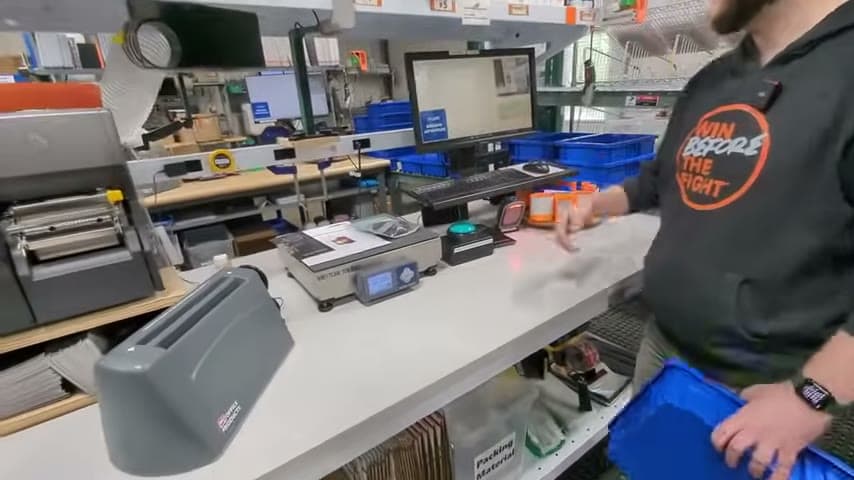
The team integrated the shipping scale, overhead document camera, label printing, and customer email into one button. Pressing the button saves the weight, buys the label, prints the postage, takes a picture, attaches the photo and tracking information to an email, and sends it to the customer.
Build the proven process into one reusable action.
What is a One Button Shipping Station?
A one-button shipping station is a workstation where the correct shipping sequence is captured once and triggered the same way every time. The operator places the shipment on the scale and presses one button instead of remembering each separate task.
In this example, the station uses a scale with an overhead document camera above it. The button saves the weight, buys the shipping label, prints the postage, takes a picture, and sends the photo plus tracking information to the customer by email.
The value is knowledge reuse. The known good method is built into the station so every shipment follows the same standard, and a single sheet document folder can stay with the station for related paperwork.
Why it works
It reuses the proven shipping method, adds customer value, and makes the process harder to do incorrectly.
- Knowledge reuse: the correct sequence is built into the button, so each person does not have to recreate the process from memory.
- Added value: the customer receives tracking information and a shipment photo as part of the normal workflow.
- Mistake-proofing: weight capture, postage purchase, printing, photo capture, and email are linked so the process is harder to leave unfinished.
- Defect prevention: fewer separate handoffs reduce the chance of missing tracking, missing photos, or incomplete customer notification.
Evidence: The transcript says one button saves the weight, buys the label, prints the postage, takes a picture, attaches the photo and tracking information to an email, and sends it to the customer.
How to create this idea
- 1Map the sequence
Write the exact steps for a correct shipment, from weighing to customer notification. Include any proof photo or tracking information that must be sent.
- 2Choose one trigger
Use one button or one clear screen action as the standard trigger. Make the correct process easier to run than the manual workaround.
- 3Connect the station
Link the scale, label printing, overhead document camera, and email step so information moves through the process without reentry.
- 4Build in proof
Capture the shipment photo during the same button press. Attach the photo and tracking information to the customer email.
- 5Test real shipments
Run normal packages through the station and watch for missing fields, wrong outputs, or confusing prompts. Adjust until the correct path is obvious.
- 6Standardize the use
Document the one-button process at the shipping area. Train people to use it as the normal method, not as an optional shortcut.
Best used when
- repeat shipping
- customer tracking
- proof photos
- manual emails
- postage errors
Less useful when
- rare shipments
- custom freight
- manual postage only
- no customer emails
Products and tools mentioned
- Document folder: Mentioned as a single sheet folder at the shipping station.
- Overhead document camera: Used to provide a live feed and take a photo over the scale.
- Push button: Used as the single trigger for the integrated shipping workflow.
- label printer: Printer that produces labels for parts, bins, and inventory tracking.
- shipping scale: Used after the shipping class is announced.
Tags
- Problem
- missed stepswrong postagemanual emails
- Lean methods
- mistake proofingstandard workautomation
- Application
- shippingfulfillmentcustomer updates
Captured from Audacity Micro at Henry Holsters in the video "THIS is what a LEAN shop looks like - Lean Machine Shop Tour", at 00:12:44. On Lean Toolbox. Watch the original video on YouTube ↗