Magnet Tags to Mark Carbon Fiber Filament on 3D Printers
Color-coded magnets identify CF filament and lock in-progress printers so no one crashes a job.
- Creator
 Audacity Micro
- Company
- Henry Holsters
- Wastes
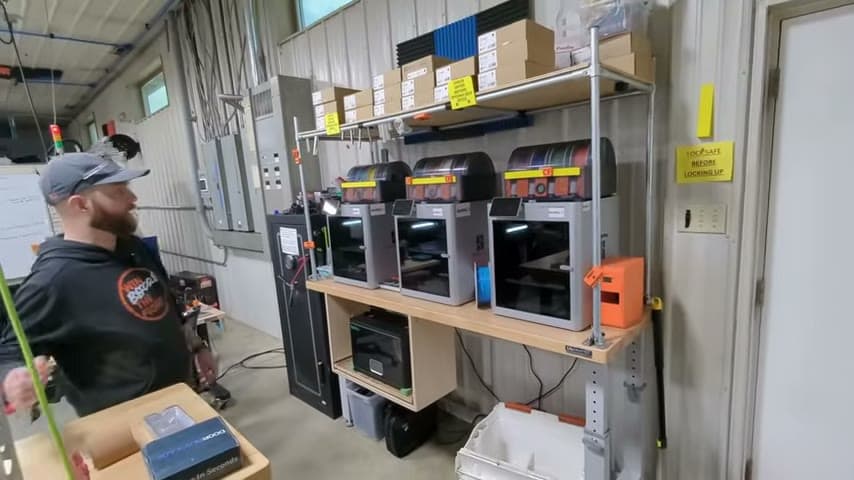
With three identical Bamboo Labs X1C printers running various filaments, operators cannot tell at a glance which spool is carbon fiber or which printer already has a job running, leading to wrong-material prints and crashes from sending a new program onto an occupied bed.
The team applies magnet tags to mark carbon fiber (CF) filament so it is identifiable from a distance, and tags the handle of any printer that is in progress so nobody sends another program and crashes into an existing part.
Make critical state visible at a glance so mistakes are prevented before they happen.
What is a Magnet Tags to Mark Carbon Fiber Filament on 3D Printers?
A magnet tag is a small, movable visual marker stuck to a printer or its filament to signal an important status: this spool is carbon fiber, or this machine is busy. Because the magnet is easy to place and remove, it travels with the current state of the work.
Here the shop runs three Bamboo Labs X1C printers with AMS units. One magnet color marks CF filament so anyone can spot it from across the room. A second tag goes on the handle of a printer that is mid-job, warning operators not to queue another program onto that machine.
It is a low-tech poka-yoke layered on top of the printer software, turning invisible machine state into a physical, glanceable signal.
Why it works
The tags capture the shop's hard-won knowledge about material choice and machine status and make it instantly reusable by anyone walking by.
- Encodes 'this is CF filament' as a shared visual standard, not tribal memory.
- The in-progress handle tag mistake-proofs job dispatch, preventing crashes into existing parts.
- Any operator, not just the person who started the job, can read the state correctly.
- Cheap, movable magnets keep the signal accurate as work changes.
How to create this idea
- 1Pick the statuses worth signaling
Identify the states that cause defects or crashes, such as filament type and machine-in-use.
- 2Assign a magnet code
Choose a distinct magnet color or shape for each status, for example one color meaning carbon fiber filament.
- 3Place tags where they are seen from a distance
Mark CF spools on the AMS so the material reads across the room; tag the machine handle for in-progress jobs.
- 4Make tagging part of the workflow
Attach the in-progress tag when starting a job and remove it only after the finished part is cleared.
- 5Standardize and share the key
Document what each magnet means so every operator reads them the same way.
Best used when
- multiple identical machines
- several filament or material types
- shared equipment
- crash-prone job dispatch
Less useful when
- single dedicated machine
- one material only
- fully automated status locking
Products and tools mentioned
- 3D printer: Additive manufacturing machine that builds custom parts, jigs, and fixtures from digital models.
- magnet: Magnetic component used to hold, position, or organize metal items.
Tags
- Problem
- wrong materialmachine crashhidden status
- Lean methods
- poka-yokevisual management5S
- Application
- 3D printingadditive manufacturingshop floor
Captured from Audacity Micro at Henry Holsters in the video "THIS is what a LEAN shop looks like - Lean Machine Shop Tour", at 00:02:38. On Lean Toolbox. Watch the original video on YouTube ↗