Daily Metrics Board: Track Orders, Safety, and Downtime at a Glance
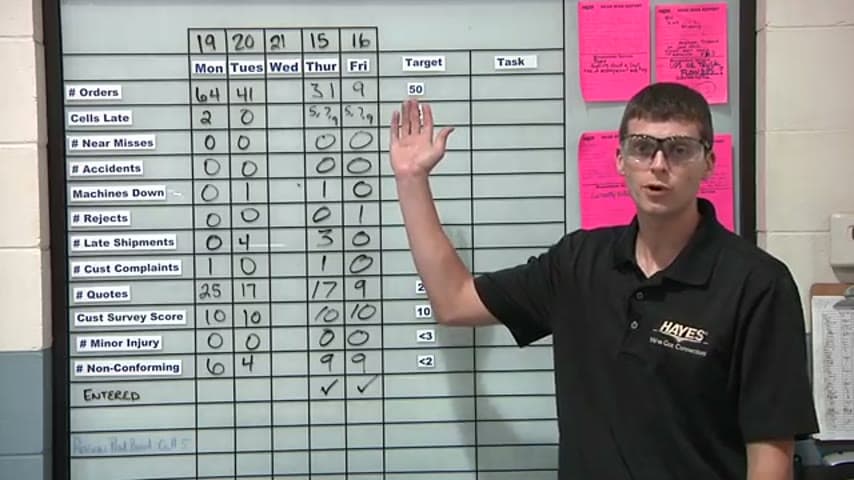
A shared board shows the day's key numbers on a rolling week so the whole team sees the same status.
- Creator
 Northwestern Michigan College
- Company
- Hayes Manufacturing
- Wastes
Key operational data like material availability, orders, safety incidents, and machine downtime lived in people's heads or scattered systems, so problems surfaced too late. Sending a job to the shop without material on hand could cost a full week waiting on an order.
The team built a daily board that covers all key metrics for the day, laid out as a rolling week so recent days stay visible. Each morning the board is updated and reviewed to keep a finger on the pulse of orders, safety, and machine downtime.
Make the vital few metrics visible in one shared place so the team manages by fact, not memory.
What is a Daily Metrics Board?
A daily metrics board is a physical visual management tool that displays a plant's most important numbers in one fixed location. Common categories include order volume, safety incidents, machine downtime, and material readiness.
This board uses a rolling week layout. Instead of a single snapshot, it shows a few days back and the current day, so trends and recent gaps stay in view. Yesterday's column is filled in, today's gets updated, and older days roll off.
The board becomes the reference point for a short standup or huddle. Everyone reads the same status, so decisions about material ordering, staffing, and priorities are made from shared facts rather than guesswork.
Why it works
The board turns scattered, tribal knowledge into a shared, reusable picture that anyone can read and act on.
- Makes proven status checks, like confirming material on hand, a visible daily habit instead of a memory task.
- Lets the whole team reuse the same data, so nobody rediscovers a problem that is already known.
- Mistake-proofs job release by surfacing missing material before a job hits the shop floor.
- The rolling week keeps context alive so recurring issues get spotted, not forgotten.
Evidence: Missing material used to send a job to the shop and cost a good week of time waiting on an order; the board helps ensure material is on hand at any given time.
How to create this idea
- 1Pick the vital few metrics
Choose the numbers that drive daily decisions: orders, safety incidents, machine downtime, and material readiness.
- 2Set a rolling week layout
Lay out columns for each day so recent days and today stay visible while older days roll off.
- 3Place it where the team gathers
Mount the board in a fixed, high-traffic spot so it is the shared reference point.
- 4Assign daily ownership
Make one person responsible for updating each day's column before the huddle.
- 5Run a short daily review
Meet at the board to read the metrics, flag gaps like missing material, and set actions.
Best used when
- daily standups
- shop floor status
- material readiness
- tracking safety and downtime
Less useful when
- one-off projects
- no daily rhythm
- metrics nobody acts on
Tags
- Problem
- missing materiallate problemsno visibility
- Lean methods
- visual managementdaily huddlemetrics board
- Application
- shop floormanufacturingoperations
Captured from Northwestern Michigan College at Hayes Manufacturing in the video "Lean Management Systems: Visual Management at Hayes Manufacturing", at 00:08:00. On Lean Toolbox. Watch the original video on YouTube ↗