Barcode Pick Verification: Use Audible Scan Feedback to Prevent Wrong Items
A barcode scan checks each picked item against the order and gives an immediate positive or negative tone.
- Creator
 Audacity Micro
- Company
- Henry Holsters
- Wastes
A wrong item can be picked into a bin and passed to packaging before the mistake is caught.
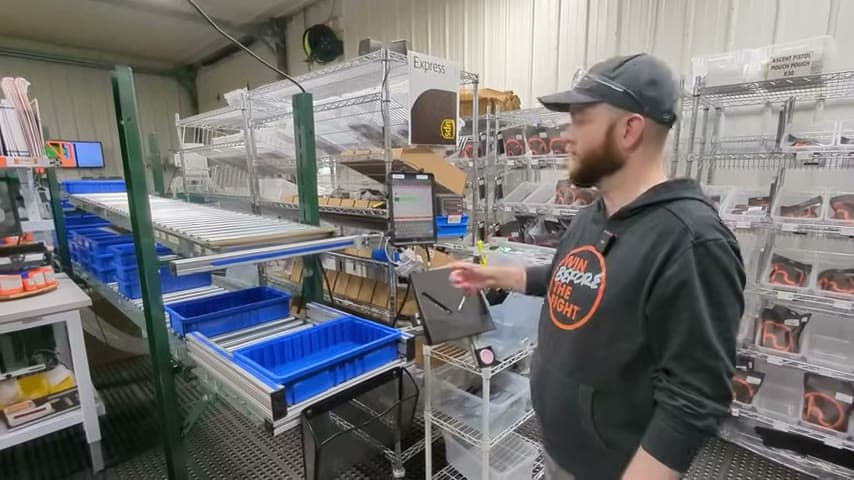
The team scans items to verify them with their own software, which integrates with ShipStation. A correct scan gives a positive audible tone, and an incorrect scan gives a negative audible tone before the order continues to packaging.
Reuse order data at the point of work to mistake-proof the pick.
What is a Barcode Pick Verification?
Barcode pick verification is a mistake-proofing method for order fulfillment. Each picked item is scanned, and the software compares the scan to the order record.
In this example, the picker fills a bin and sends it on a roller conveyor toward the packaging station. The team scans everything to verify that the picked items match the order.
The important feature is immediate audio feedback. A positive tone tells the picker the item is correct. A negative tone tells the picker the item is wrong, so the error can be corrected while the work is still in hand.
Why it works
This works because the system reuses known order information at the exact point where a picking defect can occur.
- Reuses the order data in ShipStation instead of asking the picker to rely on memory or a visual guess.
- Adds value by protecting the customer order from wrong items before it reaches packaging.
- Mistake-proofs the pick with immediate positive or negative audio feedback.
- Makes the proven standard reusable for every picker through the same simple software interface.
Evidence: The transcript says everything is scanned to verify, the software integrates with ShipStation, and the system gives a positive or negative tone when the right or wrong item is scanned.
How to create this idea
- 1Choose the source of truth
Use the order record in your shipping or fulfillment software as the standard for what should be picked.
- 2Connect scan data
Link barcode scanning to the order system so each scan can be checked against the expected item.
- 3Give instant feedback
Set one clear audible tone for a correct scan and a different tone for an incorrect scan.
- 4Use a simple interface
Show only the information needed to confirm the scan result and correct the pick.
- 5Create a stop rule
Make a negative tone mean the item must be corrected before the bin continues to packaging.
- 6Verify every item
Build the scan into standard work so each picked item is checked the same way every time.
Best used when
- order picking
- shipping accuracy
- similar items
- high SKU count
- barcode labels
Less useful when
- no barcodes
- very low volume
- custom unlabeled items
- paper only systems
Products and tools mentioned
- Shipping software: ShipStation is used as the order data system that the verification software integrates with.
- barcode scanner: Device that reads barcodes for inventory, tracking, and data entry.
- picking bin: Holds picked items before they move toward packaging.
- roller conveyor: Conveyor with rollers for moving parts and materials along a line with minimal effort.
Tags
- Problem
- wrong itemspicking errorsdefects
- Lean methods
- poka yokestandard workknowledge reuse
- Application
- order pickingfulfillmentshipping
Captured from Audacity Micro at Henry Holsters in the video "THIS is what a LEAN shop looks like - Lean Machine Shop Tour", at 00:11:37. On Lean Toolbox. Watch the original video on YouTube ↗