Wi-Fi Connected Mobile Workstations for Fast Desk Reconfiguration
Roll, unplug, and restart desks anywhere without rewiring ethernet, so layout changes cost minutes instead of hours.
- Creator
 TheAMEConnect
- Improvement date
- June 16, 2024
- Company
 Southwest Steel Buildings
- Wastes
Built-in desks with hardwired ethernet lock the floor layout in place. When needs change and desks must move, downtime piles up while cables are rerouted and connections are re-established.
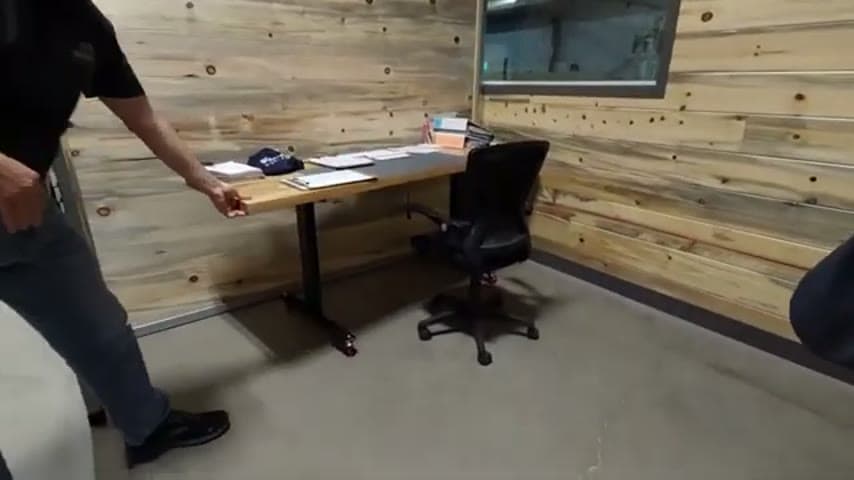
The team replaced built-in desks with mobile stand-up/sit-down desks on wheels and connected each workstation over Wi-Fi instead of ethernet. A desk can be unplugged, rolled to a new spot, plugged in for power, and restarted quickly with the network already available anywhere in the space.
Design the workspace so equipment is easy to relocate; remove fixed dependencies that resist change.
What is a Wi-Fi Connected Mobile Workstations for Fast Desk Reconfiguration?
A mobile workstation is a height-adjustable desk on wheels that connects to the network wirelessly rather than through a fixed ethernet cable. Because the only tethered dependency is power, the desk can be positioned wherever work happens rather than wherever a data port exists.
Wi-Fi removes the last cable that would otherwise pin a desk to one location. Once the wireless network covers the whole floor, any desk works the same in any spot, so the layout becomes a flexible variable instead of permanent infrastructure.
This matters when future needs are uncertain. As the team notes, they do not know how many stations they will need in ten years, so they built for change rather than for a fixed plan.
Why it works
Flexible, connect-anywhere workstations make a proven layout easy to copy and re-copy without re-engineering the network each time.
- Any desk works in any location, so a good arrangement can be reproduced instantly elsewhere.
- Removing hardwired ports mistake-proofs moves; there is no wrong port to plug into.
- The floor plan becomes a reusable, adjustable asset instead of frozen infrastructure.
- Teams can respond to changing needs without waiting on IT cabling work.
How to create this idea
- 1Extend reliable Wi-Fi coverage
Ensure the wireless network covers the entire work area so any desk position has a strong, stable connection.
- 2Switch workstations to Wi-Fi
Move desktop and peripheral network connections off ethernet and onto the wireless network.
- 3Replace fixed desks with mobile ones
Use height-adjustable desks on wheels that support both standing and seated work.
- 4Leave only power as the tether
Standardize so a desk needs only to be unplugged from power, rolled, plugged in, and restarted.
- 5Plan layout as a variable
Treat the number and placement of stations as something you adjust as needs change, not a permanent build.
Best used when
- changing space needs
- frequent layout changes
- open flexible offices
- growing or shrinking teams
Less useful when
- fixed permanent workstations
- weak Wi-Fi coverage
- high-bandwidth wired-only tasks
Products and tools mentioned
- sit-stand desk: Adjustable desk allowing seated or standing work for ergonomic comfort.
Tags
- Problem
- fixed layoutmove downtimecabling
- Lean methods
- flexibilitymistake-proofingwaste reduction
- Application
- officeworkstationsIT setup
Captured from TheAMEConnect at Southwest Steel Buildings in the video "AME 2 Second Lean Tour: Southwest Steel Buildings", at 00:09:49. On Lean Toolbox. Watch the original video on YouTube ↗