Run-the-Business Board: Make Meeting Data Visible and Shared
A single visual board replaces paper shuffling and Excel hunts during team meetings.
- Creator
 Northwestern Michigan College
- Company
- Hayes Manufacturing
- Wastes
In meetings, someone asks a question and the answer is not in front of anyone. People give up, leave the meeting, dig through Excel spreadsheets, and hope to find the right file. Time is lost waiting while data is searched for.
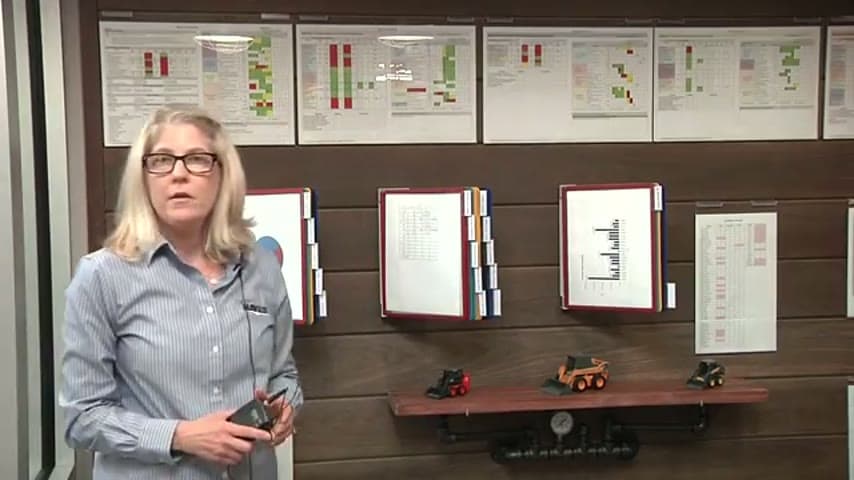
The team built a Run-the-Business board that posts the company graphs, key metrics, and A3 progress in one shared visual place. When a question comes up, the data is already displayed and everyone reviews the same numbers together.
Make the information the team needs visible and shared at the point of decision.
What is a Run-the-Business Board?
A Run-the-Business board is a physical visual management board that gathers the metrics, graphs, and improvement status a team reviews to run its operation. It holds company performance charts, other information the team decided was important, and the progress of ongoing A3 problem-solving efforts.
Instead of each person keeping data in separate Excel spreadsheets, the board centralizes it in one place where the whole team can see and discuss it during a standing meeting. Because the data is posted and current, no one has to search for it mid-conversation.
It turns scattered, private files into a single shared source of truth that supports the team's regular review cadence.
Why it works
The board makes proven, current data reusable by everyone at once instead of trapped in individual files.
- Data is visible to the whole team, so answers are shared, not owned by one person.
- Posting metrics and A3 progress makes the state of the business obvious at a glance.
- A common source of truth prevents the gap where a question dies because no one has the file.
- Reviewing the same board builds shared understanding of progress on improvement work.
How to create this idea
- 1Decide what the team must review
List the graphs, metrics, and A3 statuses the team needs to run the business and answer common questions.
- 2Pull data out of private spreadsheets
Move the key charts and numbers from individual Excel files onto shared, printed views.
- 3Build one shared board
Post company performance graphs, supporting information, and baby A3 progress in a single visible location.
- 4Hold the meeting at the board
Run reviews standing at the board so questions get answered from what is already displayed.
- 5Keep it current
Assign owners to update each section on a set cadence so the board stays trustworthy.
Best used when
- recurring team meetings
- tracking A3 progress
- shared metric reviews
Less useful when
- fully remote teams
- rarely reviewed data
- one-off analysis
Products and tools mentioned
- Microsoft Excel: Spreadsheet software for tracking data, metrics, and simple production scheduling.
Tags
- Problem
- searching datawaitingscattered files
- Lean methods
- visual managementA3run-the-business board
- Application
- team meetingsmetric reviewoffice
Captured from Northwestern Michigan College at Hayes Manufacturing in the video "Lean Management Systems: Visual Management at Hayes Manufacturing", at 00:11:19. On Lean Toolbox. Watch the original video on YouTube ↗