Order Slip Rack Beside Picker: Keep Each Pick Tied to the Right Packing Slip
Rack printed packing slips at the picking point, scan the order, fill one bin, and roll the completed bin to packing.
- Creator
 Audacity Micro
- Company
- Henry Holsters
- Wastes
Picking and packing can lose order knowledge when slips, bins, and handoffs are not tied together at the point of work. That creates confusion about the next order, bin identity, and what should move to packing.
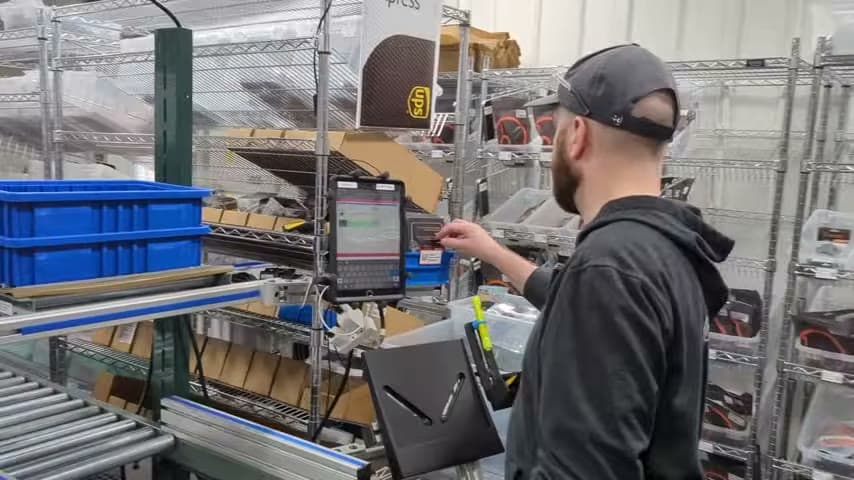
The team prints a small stack of packing slips, racks them beside the picker, uses a tablet with a Bluetooth scanner, pulls a bin, scans into the packing slip, fills the bin, and places the filled bin on a roller conveyor to packing.
Make order knowledge visible and carry it through the handoff.
What is a Order Slip Rack Beside Picker?
An order slip rack beside the picker is a point of use visual control for pick and pack work. Printed packing slips sit where the picker starts, so the next order is visible instead of hidden in a system screen or loose pile.
The picker uses a tablet and Bluetooth scanner to connect the physical work to the packing slip, then fills a bin for that order. The slip, scan, and bin create a shared reference for what is being picked.
When the bin is full, it goes on a roller conveyor toward packing. The key improvement is not only movement, it is preserving the order information from pick to pack so the next process receives a clear, usable order.
Why it works
The setup makes proven order information visible, reusable, and harder to separate from the physical bin that needs packing.
- The rack turns the next packing slips into a visible queue, so the picker does not have to recreate what should be worked on next.
- Scanning into the packing slip links the work to the order record and helps mistake-proof the bin against mixups.
- Using a bin for the scanned order carries the order knowledge with the product until packing.
- The roller conveyor creates a defined handoff, so completed bins move to packing without becoming an ambiguous pile.
Evidence: The transcript describes a two part packing operation with an iPad and Bluetooth scanner, a small stack of printed packing slips racked nearby, bins pulled down and scanned into the packing slip, then filled and dropped on a roller to head to packing.
How to create this idea
- 1Print the slips
Print a small stack of packing slips for the orders ready to pick. Keep the stack current so the rack shows real work, not old work.
- 2Rack at point of use
Place the document rack beside the picker. The next slip should be visible and reachable before a bin is filled.
- 3Scan before filling
Use the tablet and Bluetooth scanner to scan into the packing slip. Make the order record and the physical bin match before product is added.
- 4Fill one bin
Pull a bin and fill it for the scanned packing slip. Keep the order identity clear through the entire pick.
- 5Roll to packing
Place the filled bin on the roller conveyor. This gives packing a repeatable handoff point and keeps completed work separate from unpicked orders.
- 6Audit the link
Look for slips without bins, bins without a clear order, or packing questions about bin contents. Treat those as signals to improve the rack, scan step, or bin identification.
Best used when
- pick and pack
- packing handoffs
- printed slips
- scan workflows
- bin picking
Less useful when
- fully automated picking
- no fixed packing area
- single order work
- no order scan
Products and tools mentioned
- Bluetooth scanner: Used to scan into the packing slip before the bin is filled.
- document rack: Holds printed packing slips beside the picker.
- packing slip paper: Provides the printed order instruction used in the rack.
- picking bin: Holds picked items before they move toward packaging.
- roller conveyor: Conveyor with rollers for moving parts and materials along a line with minimal effort.
- tablet: Portable touchscreen device for accessing instructions, data, and apps.
Tags
- Problem
- order errorswaitinghandoff
- Lean methods
- visual managementmistake proofingstandard work
- Application
- pickingpackingfulfillment
Captured from Audacity Micro at Henry Holsters in the video "THIS is what a LEAN shop looks like - Lean Machine Shop Tour", at 00:11:14. On Lean Toolbox. Watch the original video on YouTube ↗