Visual Production Load Board with Operator Photos for Fast Rebalancing
A daily load board showing each line's workload and its assigned operator by photo, so absences are rebalanced in seconds.
- Creator
 TheAMEConnect
- Improvement date
- June 16, 2024
- Company
 Southwest Steel Buildings
- Wastes
When an operator is absent, supervisors scramble to figure out who was assigned where and how to redistribute the day's load, causing delays before work even starts.
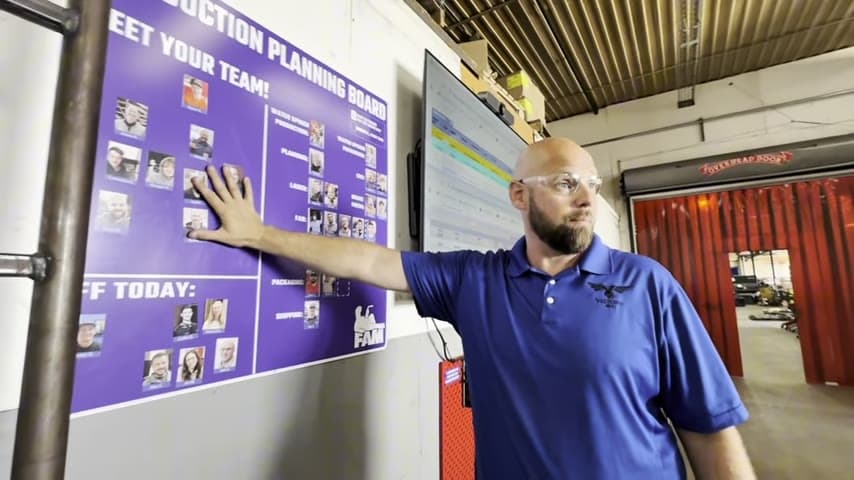
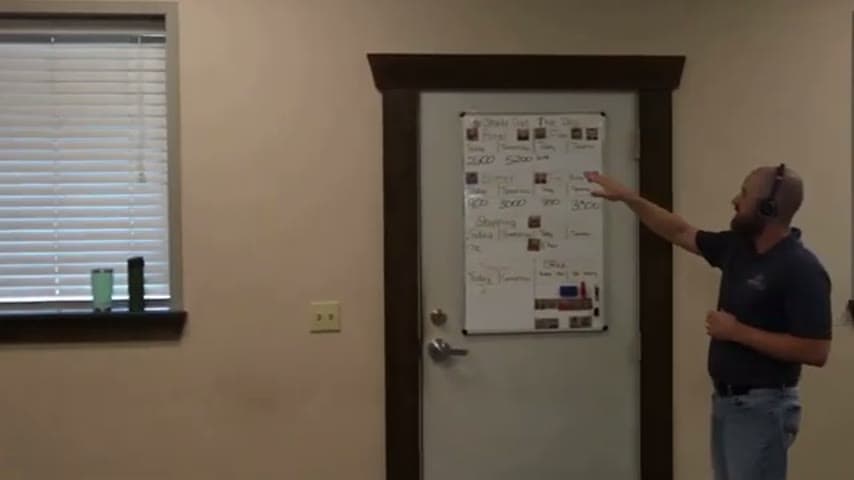
The team runs a daily 'shaking out the day' huddle at a visual production load board. Each line shows its load for the day (and next day if needed) alongside a photo of the operator assigned to it, so the crew can see coverage at a glance and rebalance immediately if someone is out.
Make the plan and its owners visible so the team can react to changes without hunting for information.
What is a Visual Production Load Board with Operator Photos for Fast Rebalancing?
A visual production load board is a shared display that lays out each production line's daily workload next to the operator responsible for it. Instead of a spreadsheet or a manager's memory, the plan lives on a board everyone can read.
The distinguishing feature here is the operator photo. Each line's load is paired with a picture of the assigned person, so anyone can instantly see who owns what without reading names or checking a roster.
The board is used in a short daily huddle the team calls 'shaking out the day.' The crew reviews each line's load for today, checks tomorrow if needed, and confirms coverage before work begins.
Because the assignments and loads are all visible in one place, an absence becomes a quick, shared decision rather than a hidden problem the supervisor solves alone.
Why it works
The board turns the daily staffing plan into shared, reusable knowledge instead of something locked in one person's head.
- Photos make ownership unmistakable, removing guesswork about who covers each line.
- A standard daily review captures the proven staffing pattern so it can be repeated and adjusted.
- Absences are surfaced and rebalanced by the whole team, preventing a stalled start.
- Anyone, including a stand-in supervisor, can read the board and act without prior briefing.
How to create this idea
- 1Build a load board by line
Create one visible board with a row or column for each production line and its load for the day.
- 2Add tomorrow's load
Include a space to show the next day's load so the team can look ahead when needed.
- 3Attach operator photos
Place a photo of the assigned operator next to each line so ownership is instantly clear.
- 4Run a daily 'shake out' huddle
Gather the team at the board each morning to review loads and confirm coverage before starting.
- 5Rebalance on absences
When someone is out, use the board to reassign the load and update the photos on the spot.
Best used when
- multiple production lines
- daily staffing shifts
- frequent absences
- team huddles
Less useful when
- single fixed operator
- fully automated lines
- stable unchanging assignments
Tags
- Problem
- absence coverageunclear ownershipstartup delay
- Lean methods
- visual managementdaily huddleload leveling
- Application
- production linestaffingshift start
Captured from TheAMEConnect at Southwest Steel Buildings in the video "AME 2 Second Lean Tour: Southwest Steel Buildings", at 00:05:03. On Lean Toolbox. Watch the original video on YouTube ↗