Add a 'Stuck' Category to Your Improvement Board
A dedicated column flags stalled improvements so the team can request help and clear the delay fast.
- Creator
 TheAMEConnect
- Improvement date
- June 16, 2024
- Company
 Southwest Steel Buildings
- Wastes
Improvements stall silently. Without a visible signal, a blocked idea can sit for days while no one knows help is needed, so cycle time on improvements balloons and momentum dies.
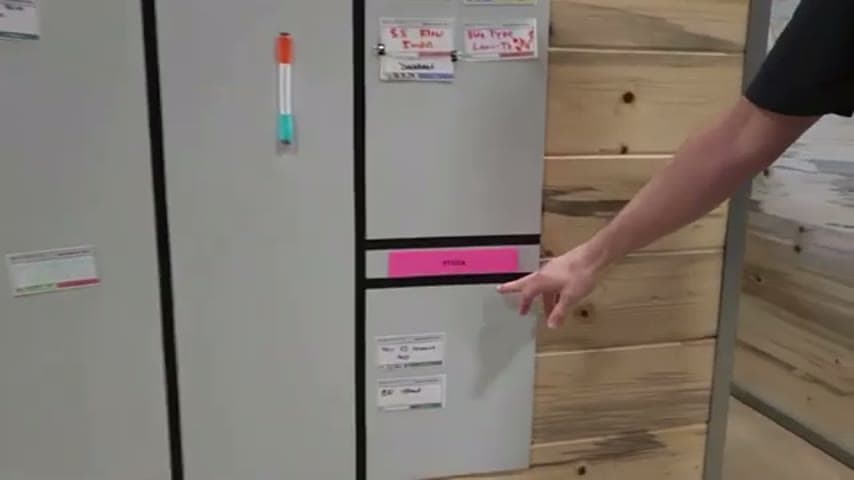
The team added a 'Stuck' category alongside 'In Progress' and 'Complete' on the improvement board. When an improvement hits a wall, the owner moves it to Stuck, making the blocker visible so the team can start each day addressing it and route help to it.
Make problems visible so blockers surface fast and help can be pulled to them.
What is a Add a 'Stuck' Category to Your Improvement Board?
A 'Stuck' category is a dedicated lane on an improvement board for improvements that have stalled and need help to move forward. It sits next to the usual states such as 'In Progress' and 'Complete'.
Instead of hiding a blocked item inside the general work-in-progress pile, the owner explicitly flags it as stuck. That single visual cue tells the team where attention is needed without anyone having to remember or investigate.
The team here uses the Stuck lane as the starting point of the day, so they open the standup by clearing blockers rather than trying to recall what needs attention. It pairs with the practice that an improvement is not complete until it is shared, keeping the whole flow visible from idea to closeout.
Why it works
A Stuck lane turns a private blocker into shared, reusable knowledge the whole team can act on.
- Surfaces a stalled improvement so others can offer a proven fix instead of the owner waiting alone.
- Prevents good improvements from quietly dying, protecting the value already invested in them.
- Gives the team a fixed daily starting point, so help is pulled to blockers without guesswork.
- Reinforces that an improvement is not done until shared, keeping learning visible across the board.
How to create this idea
- 1Add a Stuck lane
Create a dedicated 'Stuck' category on your improvement board next to In Progress and Complete.
- 2Define when to use it
Tell the team to move any improvement that is blocked or waiting on help into Stuck rather than leaving it in progress.
- 3Start the day at Stuck
Open each standup by reviewing the Stuck lane so the team addresses blockers first.
- 4Assign help and clear it
For each stuck item, name who will help and what is needed, then move it back to In Progress once unblocked.
- 5Close the loop by sharing
Only mark an improvement Complete once it has been shared, so the fix becomes reusable knowledge.
Best used when
- visual improvement boards
- daily standups
- active kaizen backlog
Less useful when
- no shared board
- very few improvements
- solo work
Tags
- Problem
- stalled workwaitinghidden blockers
- Lean methods
- visual managementkaizen boarddaily standup
- Application
- improvement boardcontinuous improvement
Captured from TheAMEConnect at Southwest Steel Buildings in the video "AME 2 Second Lean Tour: Southwest Steel Buildings", at 00:14:28. On Lean Toolbox. Watch the original video on YouTube ↗