Photos on Storage Cabinet Doors Show Contents and Layout Standard
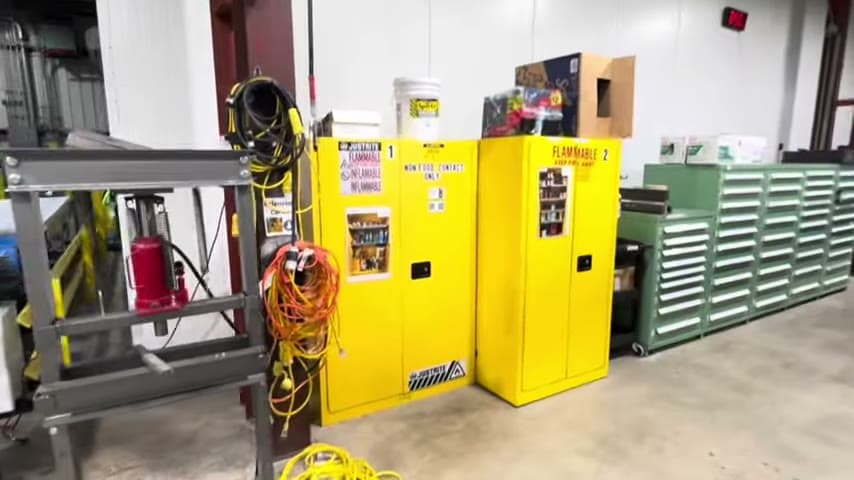
A picture on each locked door tells people what is inside and how it should be organized.
- Creator
 WillytheMinimalist
- Company
- Tennessee Cheesecake
- Wastes
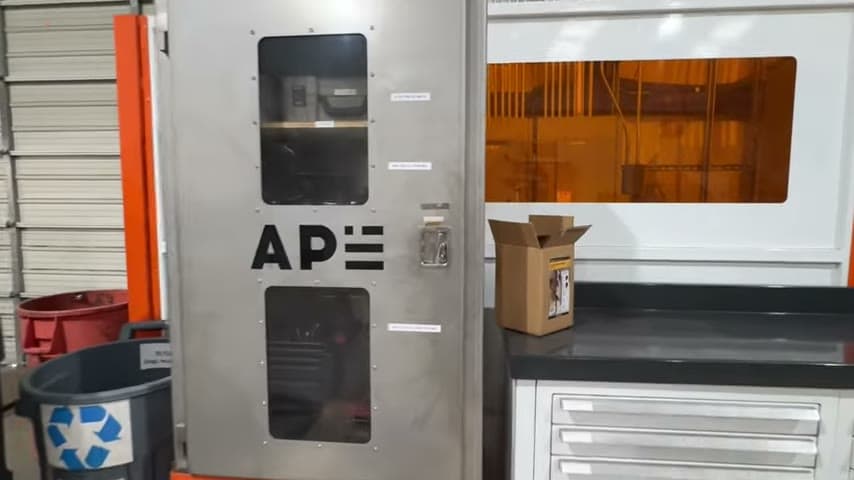
Cabinets have to be closed and locked, so workers cannot see contents. They guess which door holds an item, open several, and there is no visible standard for how each cabinet should be arranged.
The team attached a photo to each door showing exactly what is stored inside. The picture doubles as the organization standard: where each item goes and how it is laid out.
Make contents and the correct state visible at the point of use with a photo standard.
What is a Photos on Storage Cabinet Doors Show Contents and Layout Standard?
This is a visual management technique for closed or locked storage. Each door carries a photograph of the items inside, so the door itself communicates contents without being opened.
The same photo also acts as a 5S standard. It shows the correct arrangement of items, so anyone can see at a glance whether the cabinet is organized properly and can restore it to that state.
It combines two jobs in one image: a directory of what is where, and a reference for how things should look when put away correctly.
Why it works
The photo captures a proven layout and shares it with everyone who uses the cabinet.
- The correct organization is documented in an image instead of living in one person's head.
- Anyone, including new staff, can find items and put them back right without asking.
- Deviations are obvious because the actual contents can be compared to the picture.
- Locked doors stay usable because the label carries the knowledge the doors hide.
Evidence: The tour reviewer called it a great lean visual concept because it removes guessing about which door holds an item.
How to create this idea
- 1Organize the cabinet to a good standard
Arrange the contents the way they should always be stored before you photograph them.
- 2Photograph the correct state
Take a clear photo of the inside showing every item in its place.
- 3Mount the photo on the door
Print and fix the image to the outside of the matching door so it is visible while closed.
- 4Use the photo as the audit reference
During cleanup or checks, restore the cabinet to match the picture exactly.
- 5Update the photo when the standard changes
Reprint the image whenever contents or layout are improved so it stays accurate.
Best used when
- locked cabinets
- closed storage
- shared supplies
- 5S standards
Less useful when
- open shelving
- constantly changing contents
- single-user storage
Tags
- Problem
- hidden contentsguessing locationno standard
- Lean methods
- visual management5Sstandard work
- Application
- storage cabinetstool storagesupply rooms
Captured from WillytheMinimalist at Tennessee Cheesecake in the video "Tennessee Cheesecake Lean Tour", at 00:06:08. On Lean Toolbox. Watch the original video on YouTube ↗