Magnetic Drill Docks for Point-of-Use Tool Access
Mount drills and drivers on magnetic docks at each workstation so the right tool is always within reach.
- Creator
 Audacity Micro
- Company
- Henry Holsters
- Wastes
Tools stored in trays or shared drawers force operators to hunt, swap bits, or walk away from the machine, and loose tools clutter the work area and end up in the way of doors and moving parts.
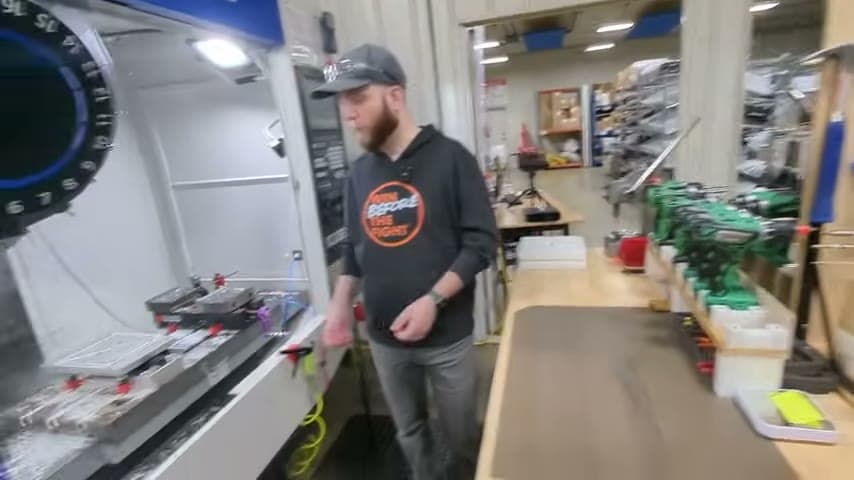
The team built their own magnetic drill docks that hold the drill or driver right at the entrance to the machine, so an operator can reach over, grab the tool, use it to fasten screws or the part, and set it straight back on the dock.
Store tools at point of use so the right one is always where the work happens.
What is a Magnetic Drill Docks for Point-of-Use Tool Access?
A magnetic drill dock is a small mounted holder that uses a magnet to grip a power drill, driver, or bit tray and keep it at a fixed home position at the workstation.
Here the docks are custom made to fit the team's own tools and are placed right at the entrance to the machine. That location keeps the tool close to where fastening happens without blocking the door as it opens and closes.
Because each tool has a dedicated dock, it always returns to the same visible spot. The operator reaches over, uses the tool, and puts it back in one motion, with no digging through trays or swapping bits mid-task.
Why it works
A fixed home for each tool turns a good habit into a visible standard that anyone can follow.
- The dedicated dock makes the correct tool location obvious, so the right tool is grabbed every time.
- A missing tool on the dock is an instant signal that something is out of place.
- Custom docks capture the team's own best setup and let every operator reuse it the same way.
- Placing the dock clear of the door prevents tools from being knocked or damaged by the machine.
How to create this idea
- 1Identify the point of use
Find where the tool is actually used, such as the entrance to the machine, and confirm it will not block doors or moving parts.
- 2Build a dock to fit the tool
Make or buy a magnetic holder sized to your specific drill, driver, or bit tray so it seats securely.
- 3Mount at reach distance
Fix the dock within an easy reach of the operator's working position.
- 4Standardize return
Train the habit of use it, then put it back on the dock so the home position stays reliable.
- 5Check clearance
Open and close the machine door to verify the docked tool stays out of the way.
Best used when
- frequent tool grabs
- fixed workstations
- machines with doors
- handheld power tools
Less useful when
- rarely used tools
- no ferrous mount surface
- highly mobile work
Products and tools mentioned
- magnetic tool holder: Magnetic strip or bar used to store and organize hand tools.
Tags
- Problem
- tool huntingclutterbit swapping
- Lean methods
- point of use5Svisual management
- Application
- workstationmachininghand tools
Captured from Audacity Micro at Henry Holsters in the video "THIS is what a LEAN shop looks like - Lean Machine Shop Tour", at 00:08:04. On Lean Toolbox. Watch the original video on YouTube ↗